One document for the whole job.
Write the brief, track the tasks, plan the timeline and collect the references on a single page. Laypen puts tables, boards, Gantt charts and whiteboards inside your document, and keeps all of it on your Mac.
macOS 13 or later · Apple Silicon and Intel · No account needed
- No account
- Stored on your Mac
- Works offline
- 10 languages
- PDF, Word and Excel export
Laypen in brief
- What is Laypen?
- Laypen is a document app for Mac. A single document can hold text, calculating tables, kanban boards, Gantt timelines, calendars, image cards and whiteboards.
- Who is it for?
- Product teams, online shops, studios and freelancers who plan and document their work in the same place.
- Which platforms?
- macOS 13 or later, on Apple Silicon and Intel Macs. iOS, Android and Windows versions are planned.
- What does it cost?
- The beta is free for 90 days, counted from the first time you open the app. Pricing will be decided and announced after the beta.
- Where is the data?
- In a file on your Mac. There is no account and no cloud; the app works offline.
- Which languages?
- English, Turkish, German, Spanish, French, Dutch, Italian, Portuguese, Japanese and Chinese.
From blank page to finished plan in three moves
No setup, no templates to learn first. Start typing and add what the work needs.
Write
Open a document and write like you would anywhere else. Headings, lists, to-dos and quotes format themselves as you type.
Press “/”
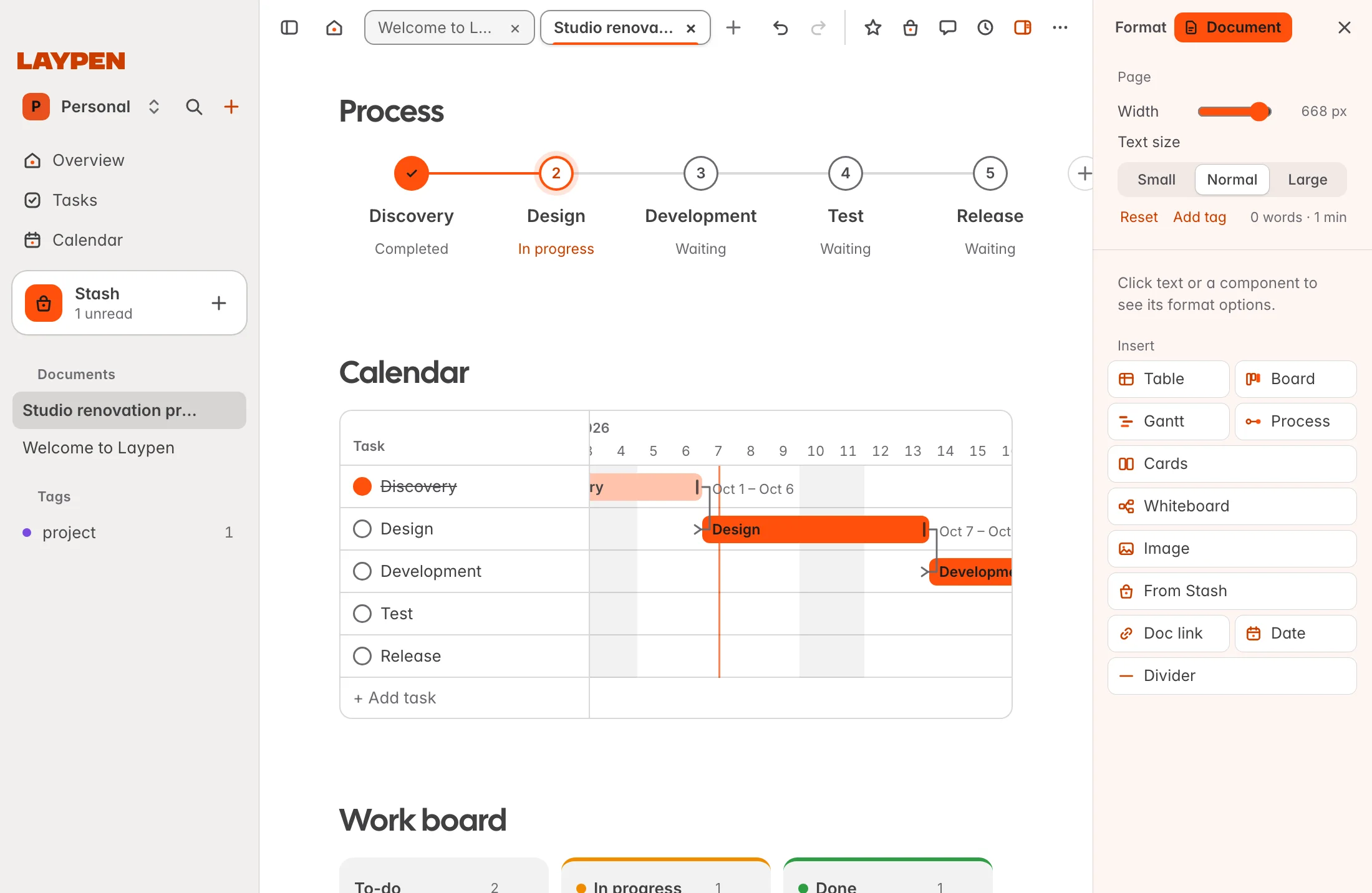
On an empty line, press “/” to drop in a table, board, timeline, calendar, card grid or whiteboard. They live in the text, not in another app.
Bring it together
Tasks and dates from every document appear in one overview. Stash keeps the links, images and notes you collected ready to place.
Built for people who ship things
Laypen fits the way product work actually happens: a little writing, a little planning, a lot of collecting.
Product teams
Keep the spec, the roadmap and the launch checklist in one document. The board shows who is doing what; the timeline shows when.
Online shops
Collect product links and photos in Stash, turn them into image cards, price them in a table and send the catalogue as a PDF.
Studios and freelancers
Write the proposal, plan the delivery on a timeline and track every client task from one overview.
Six tools you would otherwise open six apps for
Each one is a block inside your document. Use one, or all of them on the same page.
Formulas, sorting, filters and totals. Turn any column into a board with one click and keep both in sync.
Cards with due dates, checklists and progress bars. Drag a card and the work moves forward.
A Gantt chart you edit with the mouse, plus step-by-step processes that show where things stand.
Every to-do and date from all your documents, gathered automatically. Your macOS calendars can sit beside them.
Image cards for products and ideas, and a whiteboard for mind maps you can export as PNG or JPG.
A PDF with its own print design, Word and Excel export, version history, and undo for everything.
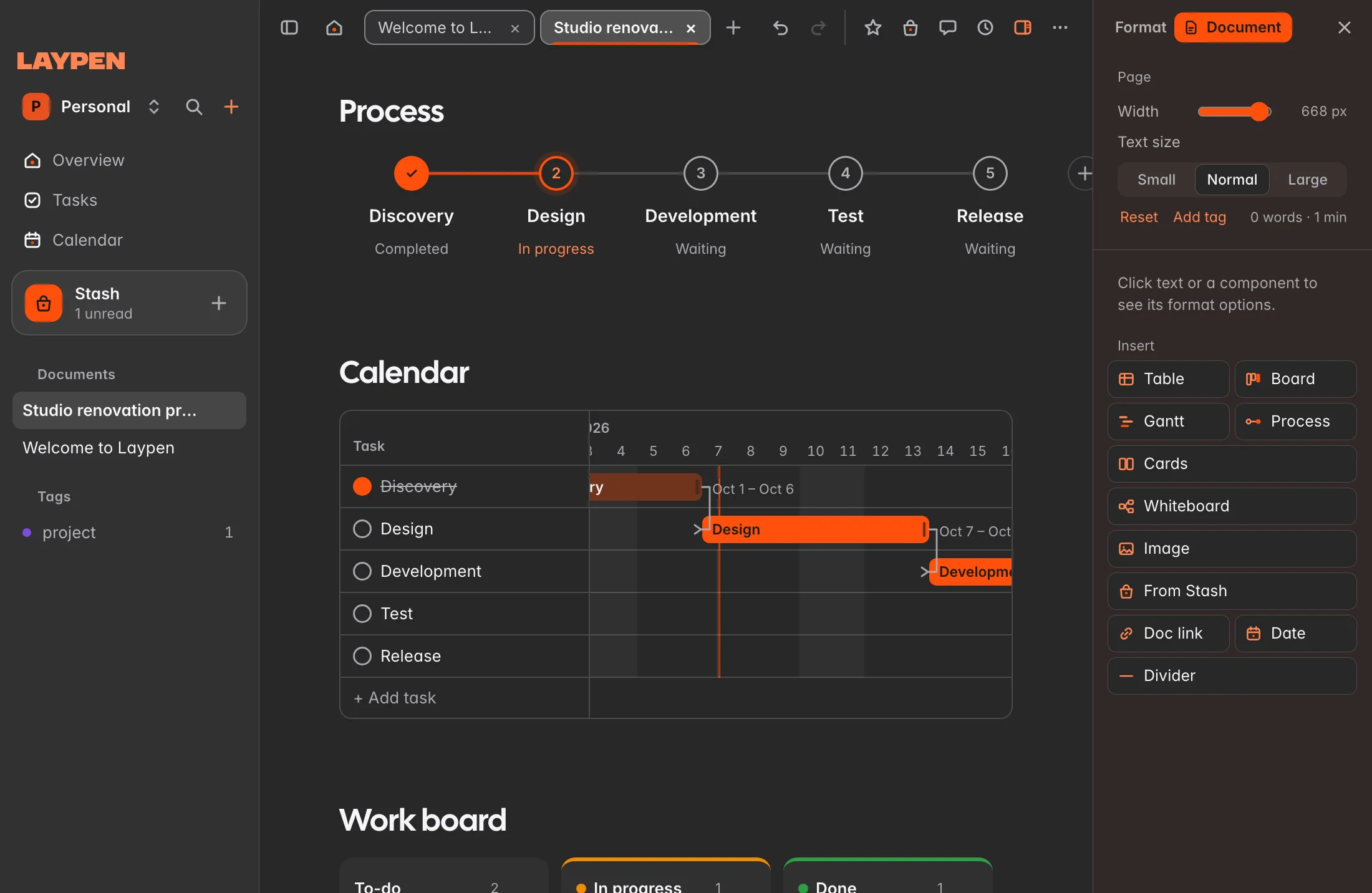
Real screens from Laypen. Click the image to enlarge it.
Stash: collect now, place later
Research rarely arrives in order. Save a link, an image or a note the moment you find it, without deciding where it belongs. When you write, your collection is one drag away.
- Save from anywhere in the app with one shortcut
- Organise with nested categories and your own fields
- Drag from the drawer straight into the page as a card, a row or a note
Your work stays yours
Laypen was built to work without a server. That is a feature, not a limitation.
No account, no cloud
Everything is saved in a file on your Mac. Laypen keeps a daily backup next to it for seven days.
No tracking
The app contains no analytics and no advertising code. We do not know what you write.
Locked when you leave
Protect Laypen with Touch ID or your Mac password.
And the details are taken care of
- 10 languages
- Light and dark themes
- Six colour palettes
- Keyboard shortcuts for everything
- Works offline
- One-minute tour on first launch
- Version history
- Universal: Apple Silicon and Intel
- Daily local backups
Frequently asked questions
Laypen is a document app for Mac in which the page itself can hold working tools: calculating tables, kanban boards, Gantt timelines, calendars, image cards and whiteboards, alongside ordinary text. People use it for project plans, product pages, quotations, sprint boards, content calendars and meeting notes. It comes with 18 templates so you do not start from an empty page.
Those products are built around an online account and a workspace stored on the company’s servers. Laypen stores everything in a file on your own Mac: there is no account, no sign-in and no subscription needed to open your documents, and it works without an internet connection. The trade-off today is that Laypen has no real-time collaboration and runs only on the Mac; you share work by exporting it. iOS, Android and Windows versions are planned.
Besides headings, lists, to-dos, quotes and code, you can insert a table with formulas, a board, a Gantt chart, a step-by-step process, a calendar, a grid of image cards, a whiteboard, images, links to other documents and items from Stash. Press “/” on an empty line, or click the “+” that appears beside it, and choose what to add.
Stash is a collecting place inside the app. You save links, images and notes there as you find them, give them your own fields and nested categories, and later drop them into any document as a card, a table row or a note. When you save a link, Laypen reads the page title and preview image for you.
Laypen needs macOS 13 (Ventura) or later and runs natively on both Apple Silicon and Intel Macs. Versions for iOS, Android and Windows are planned for the future; they are not available yet and we have not set dates.
The beta is free. Each beta licence lasts 90 days, and the 90 days start the first time you open the app on your Mac, not when you download it. The app shows how many days are left under Settings. We have not set a price for the full version yet; pricing will be decided and announced once the beta has ended. Documents you create during the beta stay on your Mac and remain yours.
Leave your email address in the beta form on this site and we will send you a download link. You receive a signed disk image: open it, drag Laypen into your Applications folder and start it. On first launch, a one-minute tour shows where everything is.
Everything is saved in a single file in your user Library folder. Laypen keeps a daily copy of that file for seven days beside it, and each document also has its own version history. Under Settings → Data you can reveal the file in Finder or save a backup anywhere you like, for example on an external drive.
Yes. Writing, planning, exporting and searching all work without a connection. The app only goes online in one case: when you add a web link to Stash, it fetches that page once to read its title and preview image.
You can import Markdown and plain-text files. Documents export to PDF with a dedicated print design, to Word (.docx) and to Markdown; tables export to Excel (.xlsx); whiteboards export as PNG or JPG images.
No. The app has no account system, no analytics, no advertising code and no crash reporting to us, and once a day it reads a small version file from this site to see whether an update exists, sending nothing about you. This website sets no cookies. If you join the beta list or email us, we use your address only to send the download link, beta news and replies. The privacy policy explains this in detail.
The interface is available in ten languages: English, Turkish, German, Spanish, French, Dutch, Italian, Brazilian Portuguese, Japanese and Simplified Chinese. Dates, numbers, currencies and the first day of the week follow the language you choose.
Email support@laypen.app and tell us what happened and what you expected; a screenshot helps. Inside the app, the help button at the bottom left opens the guide and the list of keyboard shortcuts, and Settings lets you replay the tour.

Put your next project on one page
The beta is free for 90 days from the first time you open the app. Leave your email address and your personal download link arrives in your inbox.
macOS 13 or later · Apple Silicon and Intel · No account needed · Ask a question